Reading the Label: A Field Guide to Local LLM Formats, Quantization, and Variants
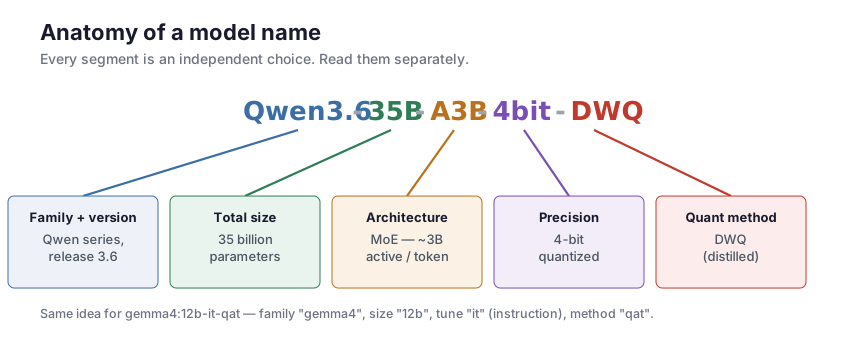
You go to download a model and the list looks like this:
qwen3.6:27b-nvfp4gemma4:12b-it-qatQwen3.6-35B-A3B-4bit-DWQMeta-Llama-3.1-8B-Instruct.Q4_K_M.ggufmlx-community/Qwen3.6-27B-8bitAlphabet soup. But every one of those suffixes is a deliberate, independent choice, and once you can read them you can pick the right file for your machine in seconds instead of downloading 20 GB to find out it doesn’t fit. This is a standalone decoder ring — no prior reading required.
The four axes
Almost everything in a model name is one of four independent decisions. Keep them separate in your head and the soup turns into a recipe:
- Architecture — how the model is built: dense vs mixture-of-experts (MoE).
- Precision / quantization — how many bits each weight uses: BF16, Q8, Q4_K_M, nvfp4, int4…
- File format / runtime — how the weights are packaged and what software runs them: safetensors, GGUF, MLX, GPTQ/AWQ, EXL2.
- Fine-tune stage — what the model was trained to do: base, instruct (
-it), chat, reasoning, coding.
A name like Qwen3.6-35B-A3B-4bit-DWQ is just one pick from each bucket (plus a quality trick). Let’s take the buckets one at a time.
Axis 1 — Precision: what a “weight” actually costs
A model is billions of numbers (weights). Precision is how many bits you spend storing each one. Fewer bits = smaller file and less memory = but eventually, worse quality.
The full-precision formats (training-grade):
- FP32 — 32-bit float. 4 bytes per weight. What models are often trained in; rarely shipped for inference (huge).
- FP16 — 16-bit float: 1 sign, 5 exponent, 10 mantissa bits. More precision, but a narrow numeric range that can overflow during training.
- BF16 (“brain float”) — 16-bit float: 1 sign, 8 exponent, 7 mantissa bits. Same range as FP32, less precision. The narrower exponent of FP16 is exactly why modern training prefers BF16 — it won’t overflow. For inference the two are practically equivalent.
The size math is simple — bytes per weight × parameter count:
| Precision | Bytes/weight | A 13B model |
|---|---|---|
| FP32 | 4 | ~52 GB |
| BF16 / FP16 | 2 | ~26 GB |
| 8-bit | 1 | ~13 GB |
| 4-bit | ~0.5 | ~7 GB |
That’s the whole reason quantization exists: a 13B model at BF16 needs 26 GB; at 4-bit it needs ~7 GB and fits on a laptop.
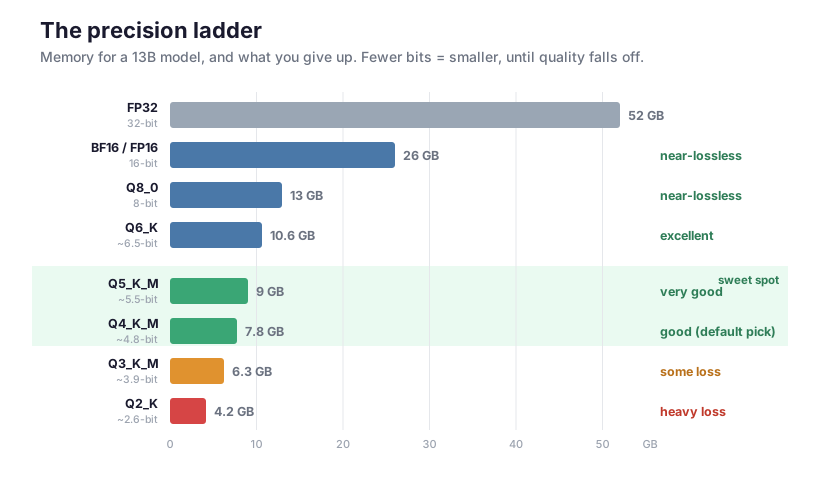
The key insight from that ladder: quality stays near-lossless all the way down to ~6 bits, holds up well at 5 and 4 bits, and only really degrades at 3 bits and below. That’s why Q4–Q5 is the default sweet spot — most of the memory savings, almost none of the quality loss.
Axis 2 — Quantization: the zoo of ways to get to 4 bits
“4-bit” isn’t one thing. How you squeeze a 16-bit weight down to 4 bits matters enormously for quality. Two big families:
Post-training quantization (PTQ) — take a finished model and compress it. Fast, no retraining. Most quants are PTQ.
Quantization-aware training (QAT) — train (or fine-tune) the model while simulating the rounding, so it learns to be robust to low precision. More expensive to produce, but a QAT int4 model is noticeably closer to full quality than a naive PTQ int4. Google ships -qat builds of Gemma for exactly this reason.
Now the suffixes you’ll actually see:
Q8_0,Q4_K_M,Q5_K_M— the GGUF k-quants. The number is the bit width;_Kmeans “k-quant” (a smarter scheme that spends more bits on the tensors that matter, like attention, and fewer elsewhere);_S/_M/_Lis small/medium/large within that width.Q4_K_Mis the community default — ~4.8 effective bits, great quality/size balance.IQ2_…,IQ3_…,IQ4_…— “importance-matrix” quants. They use a calibration pass (an imatrix) to figure out which weights are important and protect them, squeezing usable quality out of very low bit widths (2–4 bits) where plain quants fall apart.nvfp4,mxfp4— 4-bit floating-point formats with micro-block scaling (a shared scale per small block of weights). Floating-point 4-bit handles outlier weights better than plain integer 4-bit.nvfp4is NVIDIA’s;mxfp4is the open “microscaling” standard.GPTQ— a popular PTQ method for GPUs; quantizes layer by layer to minimize error. Runs on CUDA.AWQ— activation-aware weight quantization: protects the small fraction of weights that activations care most about. Strong 4-bit quality on GPUs.EXL2— the ExLlamaV2 format: variable bits-per-weight (you can target, say, 4.65 bpw), very fast on NVIDIA.DWQ— distilled weight quantization (seen in the MLX community): after quantizing, the weights are tuned against the original full-precision model to claw back lost quality. A quality-recovery trick layered on top of plain quantization.
And one that is not quantization at all but often sits nearby:
- Distillation — training a smaller model (the “student”) to mimic a larger one (the “teacher”). A distilled 7B is a different, genuinely smaller model — not a compressed copy of the big one. Don’t confuse “distilled” (fewer parameters) with “quantized” (same parameters, fewer bits).
Axis 3 — File format & runtime: where it’ll actually run
The format decides which software loads the model, and that software decides which hardware you can use. This is the axis people most often get wrong (downloading a CUDA-only quant for a Mac).
- safetensors — the Hugging Face container for raw, full-precision weights (FP16/BF16). Loaded by PyTorch /
transformers/ vLLM. It’s the “source” format most quants are made from. Big, but runs anywhere those libraries run. - GGUF — the llama.cpp / Ollama format. Cross-platform, runs on CPU and offloads to GPU (Metal, CUDA, etc.), and crucially it respects a context-length setting (
num_ctx). The universal default for local use. - MLX — Apple’s framework, built for Apple Silicon’s unified memory. The fastest option on a Mac, but Apple-only.
- GPTQ / AWQ / EXL2 — GPU-oriented quant formats. Built for NVIDIA (CUDA); not for Apple Silicon or CPU.
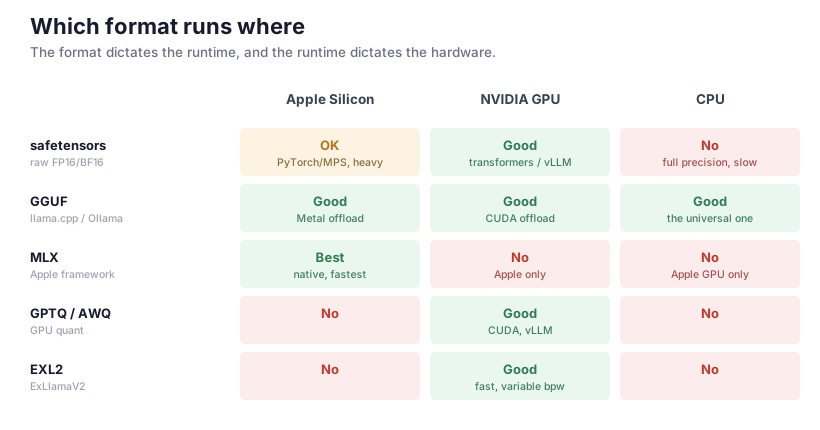
The short version: on a Mac, prefer MLX (fastest) or GGUF (most flexible). On an NVIDIA box, GGUF, GPTQ/AWQ, or EXL2. On CPU-only, GGUF. MLX and the CUDA formats don’t cross over.
A note from experience: on Apple Silicon, MLX decodes meaningfully faster than the GGUF/llama.cpp engine — but GGUF lets you cap the context window while MLX loads the model’s full native context. So the “fastest” format isn’t always the right one if memory is tight.
Axis 4 — Architecture: dense vs MoE (and what “A3B” means)
- Dense — every parameter participates in every token. A 27B dense model does 27B parameters’ worth of math per token. Simple, strong, but compute-heavy.
- Mixture-of-Experts (MoE) — the model has many “expert” sub-networks, and a small router picks just a few per token. The naming convention spells it out:
35B-A3B= 35B total parameters, ~3B active per token.
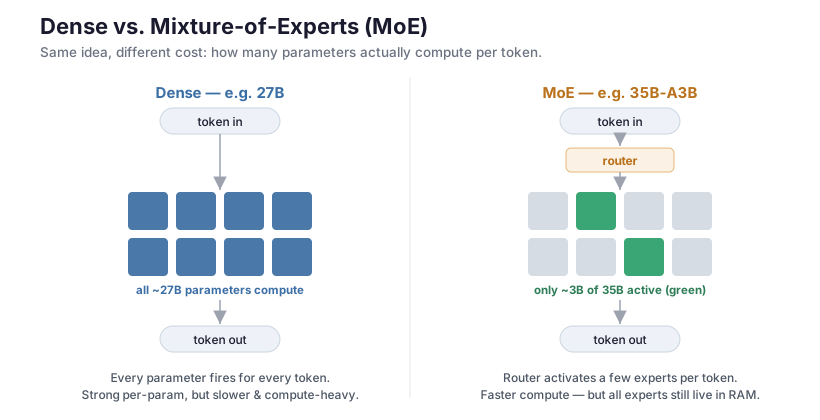
The trade-off that trips people up: an MoE is fast like its active size but heavy like its total size. A 35B-A3B decodes roughly as fast as a ~3B model, but all 35B parameters still have to live in memory (you never know in advance which experts a token will need). So MoE buys you speed, not a smaller memory footprint.
Axis 5 (bonus) — the fine-tune stage
What the weights were last trained to do:
- base (no suffix, or
-base) — raw next-token predictor. Not conversational; for fine-tuning or completion. -it/-instruct/-chat— instruction/chat tuned. This is what you want for an assistant. (-it= “instruction-tuned”, same idea as-instruct.)- reasoning /
-thinking— emits a hidden chain-of-thought before answering. Higher quality on hard problems, but slower and more tokens; many can be told to skip it. -coding— fine-tuned for code.
Putting it together: decode these
gemma4:12b-it-qat→ Gemma family · 12B dense · instruction-tuned · QAT int4 (quality-preserving 4-bit). A GGUF build for Ollama.Qwen3.6-35B-A3B-4bit-DWQ→ Qwen 3.6 · 35B total / ~3B active MoE · 4-bit · DWQ quality-recovered. (An MLX build, from the-DWQconvention.)qwen3.6:27b-nvfp4→ Qwen 3.6 · 27B dense · 4-bit floating-point · MLX (nvfp4is an MLX/Apple build).Meta-Llama-3.1-8B-Instruct.Q4_K_M.gguf→ Llama 3.1 · 8B dense · instruct · Q4_K_M k-quant · GGUF (llama.cpp/Ollama).
Zooming out: quantization is one lever in a bigger stack
Everything above is about reading a model’s label — but the label only captures part of how a model is made fast and cheap. Quantization is just one model-level optimization among several, and all of them live inside a larger stack. It helps to see the whole map:
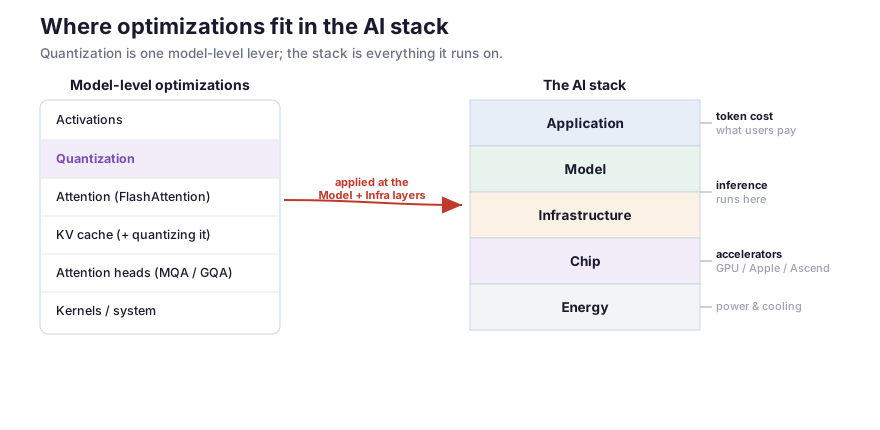
The other model-level levers you’ll hear about:
- Activations — quantizing the activations (the values flowing through the model), not just the stored weights.
- Attention (FlashAttention) — computing attention without ever materializing the giant attention matrix; big speed and memory win, especially on long inputs.
- KV cache — the running memory of every previous token. It’s what makes long contexts expensive, and it can itself be quantized (e.g. an 8-bit KV cache) to halve that cost.
- Attention heads (MQA / GQA) — multi-query / grouped-query attention let many query heads share key/value heads, shrinking the KV cache dramatically. An architectural choice baked into the model.
- Kernels / system — the low-level GPU code and runtime. This is exactly where MLX vs. the llama.cpp engine differ on Apple Silicon, where speculative decoding lives, and where a lot of real-world speed is won or lost.
And the stack those levers sit in — Application → Model → Infrastructure → Chip → Energy:
- The Model and Infrastructure layers are where quantization, attention tricks, KV-cache handling, and kernels apply — the focus of this guide.
- The Chip layer (Apple Silicon, NVIDIA GPUs, Huawei Ascend, …) sets the hard ceiling, and Energy sets the ceiling below that.
- The Application layer at the top only feels the result: latency and token cost. Every optimization down the stack is ultimately about making that top layer cheaper and faster.
So when you pick Q4_K_M over BF16, you’re pulling one lever (precision) at one layer (Model). Knowing the rest of the map is what lets you reason about why a model is slow or expensive when the quantization alone doesn’t explain it.
How to choose, by hardware
- Apple Silicon Mac: MLX build if you want max speed; GGUF if you need to cap context or want portability. Pick Q4_K_M / 4-bit unless you have memory to spare (then Q5/Q6/8-bit).
- NVIDIA GPU: GGUF (easy), or AWQ/GPTQ/EXL2 via vLLM/ExLlama for max throughput.
- CPU-only or mixed: GGUF, lower quant (Q4 or an IQ-quant) to keep it light.
- Memory-pinched: prefer QAT or AWQ/imatrix 4-bit (best quality per bit); consider a smaller dense model over a same-size MoE, since the MoE still needs all its experts resident.
- Plenty of memory / quality first: 8-bit or BF16.
Cheat sheet
Precision
| Label | Bits | Use it when |
|---|---|---|
| BF16 / FP16 | 16 | quality first, memory is no object |
| Q8_0 | 8 | near-lossless, modest savings |
| Q5_K_M | ~5.5 | high quality, smaller |
| Q4_K_M | ~4.8 | default sweet spot |
| IQ4 / IQ3 / IQ2 | 2–4 | squeezing onto tight hardware |
| Q2_K | ~2.6 | last resort; visible quality loss |
Quant method
| Tag | Gist |
|---|---|
| PTQ (most) | compress a finished model |
| QAT | trained to be quantization-robust → best low-bit quality |
k-quant (_K) | mixed bit-widths per tensor (GGUF) |
| imatrix / IQ | calibration-guided low-bit quants |
| AWQ / GPTQ | GPU PTQ methods |
| nvfp4 / mxfp4 | 4-bit float with block scaling |
| DWQ | distilled quality recovery (MLX) |
| distillation | a different, smaller model (not a quant) |
Format → hardware
| Format | Runs best on |
|---|---|
| MLX | Apple Silicon (fastest) |
| GGUF | anything (Mac/NVIDIA/CPU) |
| GPTQ / AWQ / EXL2 | NVIDIA GPUs |
| safetensors | full-precision source; PyTorch/vLLM |
Once the name stops being soup, the decision is fast: figure out your format (your hardware decides it), pick a 4–5-bit quant unless you have memory to burn, and check whether that headline parameter count is dense or MoE so you know what’ll actually fit in RAM. Everything else is a footnote.