Locking Pi to Two Models: MTPLX and Ollama Cloud on Mac
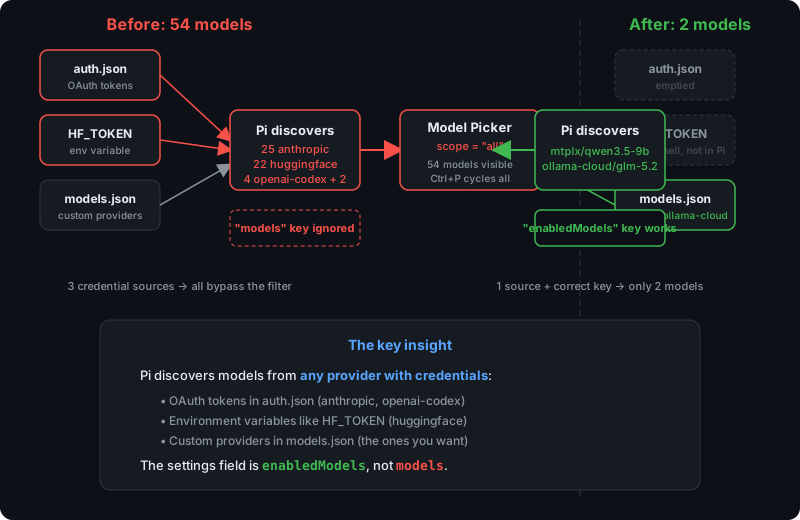
Figure 1 — How Pi discovers models from credential sources, and why the settings key name matters.
The problem: 54 models in the picker
I run Pi as my CLI coding agent, and I wanted exactly two models available: a local MTPLX instance (Qwen3.5-9B optimized for Apple Silicon) as a fast fallback, and Ollama Cloud’s GLM-5.2 as the primary reasoning model. Two providers, two models, nothing else.
Instead, every time I opened the model picker, Pi offered me 54 models. Claude Opus, Claude Sonnet, DeepSeek V4 Pro, GPT-5.5, Qwen3.5-397B, Kimi-K2.6, MiniMax-M2.7 — the full zoo. I could accidentally switch to any of them mid-session, and the startup log was a wall of model_change events cycling through every model Pi could find.
The settings.json already had what I thought was the right configuration:
{ "defaultModel": "glm-5.2", "defaultProvider": "ollama-cloud", "models": ["mtplx/*", "ollama-cloud/*"]}That "models" array looked correct. It used glob patterns. It matched the --models CLI flag’s syntax. And it was completely ignored.
How Pi discovers models
To understand why, you need to know how Pi populates its model list. It doesn’t just read your models.json — it discovers models from every provider that has credentials, and it checks three sources at startup:
| Source | File / Variable | What it enables |
|---|---|---|
| OAuth tokens | ~/.pi/agent/auth.json | Anthropic, OpenAI Codex |
| Environment variables | HF_TOKEN, OPENAI_API_KEY, etc. | HuggingFace, OpenAI, DeepSeek, and ~20 others |
| Custom providers | ~/.pi/agent/models.json | Your MTPLX and Ollama Cloud endpoints |
In my case, auth.json had stored OAuth tokens for Anthropic and OpenAI Codex from a previous pi --login, and HF_TOKEN was set in my shell for HuggingFace CLI usage. Pi saw all three sources, discovered 54 models, and stuffed them all into the picker.
The models array in settings.json was supposed to filter this — but Pi didn’t recognize the key.
The wrong key name
Here’s the thing that cost me an afternoon: the settings field is enabledModels, not models.
I found this by reading Pi’s source. In main.js:
const modelPatterns = parsed.models ?? settingsManager.getEnabledModels()parsed.models comes from the --models CLI flag. The settings.json equivalent is settingsManager.getEnabledModels(), which reads:
getEnabledModels() { return this.settings.enabledModels;}Note the key name: enabledModels. My settings.json had "models" — a key Pi doesn’t recognize. It was silently ignored, getEnabledModels() returned undefined, and the model picker fell back to showing everything.
In the model selector component, the logic is straightforward:
this.scope = scopedModels.length > 0 ? "scoped" : "all"When scopedModels is empty (because the patterns were never loaded), the scope is "all" — every discovered model. When it’s populated, the scope is "scoped" — only the matching models.
The fix: three changes
1. Rename the settings key
{ "defaultModel": "glm-5.2", "defaultProvider": "ollama-cloud", "enabledModels": ["mtplx/*", "ollama-cloud/*"]}That single rename — models → enabledModels — is what makes the model picker respect the filter. With this in place, scopedModels gets populated with the two matching models, and the picker’s scope switches from "all" to "scoped".
2. Remove unwanted OAuth credentials
# ~/.pi/agent/auth.json — before{ "anthropic": { "type": "oauth", "refresh": "<your-refresh-token>", ... }, "openai-codex": { "type": "oauth", "access": "<your-access-token>", ... }}
# after — just {}{}Even with enabledModels set, Pi still discovers models from authenticated providers. The enabledModels filter controls what the picker shows, but pi --list-models and the startup discovery log still enumerate everything. Removing the OAuth tokens from auth.json prevents Pi from discovering Anthropic and OpenAI Codex models at all.
Back up first. I copied
auth.jsontoauth.json.bakbefore clearing it. If you ever want those providers back, re-runpi --login.
3. Leave HF_TOKEN alone
This is the part that required a Pi-specific solution. HF_TOKEN lives in ~/.zsh_secrets.zsh and is sourced by my shell on startup. I need it for other tools — huggingface-cli, pulling models with Ollama — so removing it globally wasn’t an option.
With enabledModels correctly set, I didn’t need to. The picker now scopes to mtplx/* and ollama-cloud/* regardless of what Pi discovers from the environment. HuggingFace models still show up in pi --list-models (which is a diagnostic command that lists everything), but they don’t appear when I press Ctrl+P to switch models.
If you want to go further and prevent Pi from even discovering HuggingFace models, you can unset the env var for just the Pi process:
# In ~/.zshrc, after sourcing secrets:pi() { env -u HF_TOKEN command pi "$@"}This wraps pi so that HF_TOKEN is removed from its environment only, while every other shell process keeps it. I didn’t need this — enabledModels was enough — but it’s a clean option if you want zero trace of other providers.
The MTPLX setup
For context, here’s the local side of the two-model setup. MTPLX runs a single optimized model on Apple Silicon with a sustained thermal profile:
model = "Youssofal/Qwen3.5-9B-MTPLX-Optimized-Speed"model_dir = "/Users/paavan/.mtplx/models"profile = "sustained"thermal_control = "auto"It exposes an OpenAI-compatible endpoint at http://127.0.0.1:8011/v1, which Pi’s models.json points to:
{ "providers": { "mtplx": { "api": "openai-completions", "apiKey": "<your-mtplx-api-key>", "baseUrl": "http://127.0.0.1:8011/v1", "models": [ { "id": "mtplx-qwen35-9b-optimized-speed", "contextWindow": 131072, "reasoning": true } ] }, "ollama-cloud": { "api": "openai-completions", "apiKey": "your-ollama-cloud-key", "baseUrl": "https://ollama.com/v1", "models": [ { "id": "glm-5.2", "contextWindow": 1000000, "reasoning": true } ] } }}Two providers. Two models. The local Qwen3.5-9B handles quick tasks without network latency, and GLM-5.2 on Ollama Cloud handles the heavy lifting with a 1M-token context window.
Verifying the fix
After the changes, the model picker shows exactly what I want:
$ pi --list-modelsprovider model context thinkingmtplx mtplx-qwen35-9b-optimized-speed 131K yesollama-cloud glm-5.2 1M yesAnd in an interactive session, the startup log confirms the scope:
Model scope: mtplx-qwen35-9b-optimized-speed, glm-5.2 (Ctrl+P to cycle)No more 54-model scroll. No more accidental switches to Claude or DeepSeek. Just the two models I chose.
The takeaway is simple but easy to miss: enabledModels, not models. Pi’s settings schema has specific field names, and an unrecognized key is silently ignored — no warning, no error. If your model filter isn’t working, check the key name first. Then check your credential sources, because Pi will discover any provider it can authenticate against, whether you listed it in models.json or not.