nanochat and the Cheap LLM Training Landscape: From $43K to $3
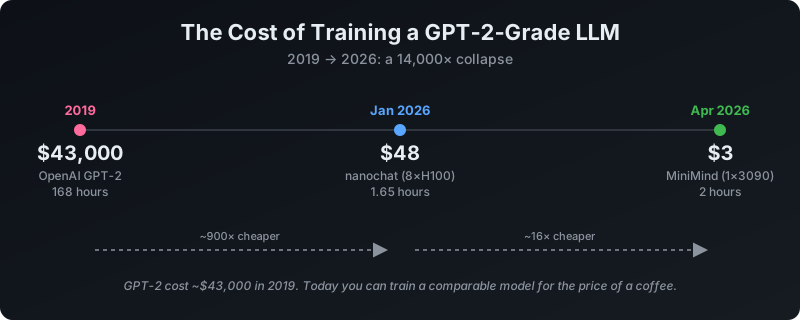
In 2019, OpenAI spent roughly $43,000 training GPT-2. In January 2026, Andrej Karpathy released nanochat, a harness that reproduces and beats GPT-2’s benchmark score in 1.65 hours on an 8×H100 node for about $48. And in April 2026, the MiniMind project demonstrated you can train a complete small language model end-to-end on a single RTX 3090 for approximately $3.
The question isn’t whether you can train an LLM cheaply anymore — you can. The question is which repo fits your hardware, your budget, and what you actually want to learn. This is a review of nanochat and a survey of what else exists on GitHub for cheap LLM training, as of mid-2026.
The Two Stages Every LLM Goes Through
Before diving into the repos, it helps to understand what they’re actually doing. Every LLM — from GPT-2 to ChatGPT to the tiny models you’ll train with the projects below — goes through at least two fundamental training stages. Everything else is refinement on top.
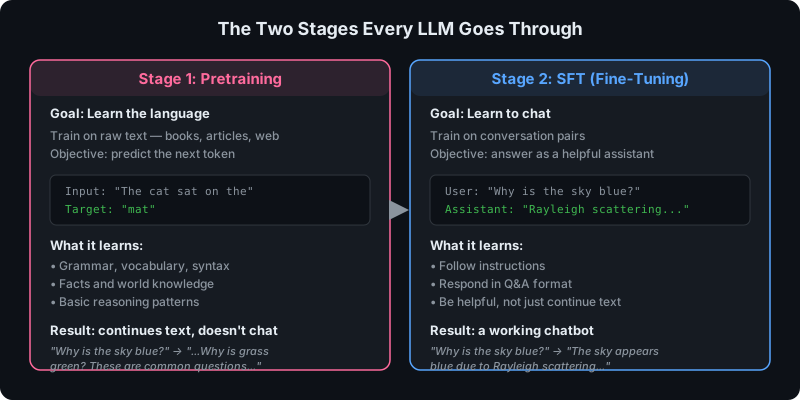
Figure 1 — Pretraining teaches the model to predict the next token from raw text. SFT teaches it to use that knowledge to answer questions as a helpful assistant.
Stage 1: Pretraining — “Learn the Language”
Pretraining is where a model learns to predict the next token from raw text. You feed it millions of lines of text — books, articles, code, Wikipedia, web pages — and the model learns the statistical patterns of human language.
Input: "The cat sat on the"Target: "mat"The model starts knowing nothing. After seeing billions of examples like the above, it learns grammar, facts, reasoning patterns, world knowledge, and how to string words together coherently. But it doesn’t learn to answer questions or follow instructions — it just learns to continue text.
If you type “Why is the sky blue?” to a pretrained-only model, you might get:
Why is the sky blue? Why is the grass green? These are commonquestions children ask about nature. In this article we will explore...It continues the text as if it’s writing an article. It doesn’t know it’s supposed to answer you. It just does what it was trained to do: predict the next plausible token.
Think of pretraining as the model reading the entire internet and learning how language works — but nobody has taught it how to have a conversation yet.
In MiniMind, this is train_pretrain.py (batch size 32, 2 epochs, learning rate 5e-4). In nanochat, this is scripts/base_train.py. This is the stage that takes the most compute.
Stage 2: SFT — “Learn to Chat”
Supervised Fine-Tuning (SFT) is where you teach the pretrained model to follow instructions and have conversations. Instead of raw text, you feed it structured conversation examples:
<|im_start|>userWhy is the sky blue?<|im_end|><|im_start|>assistantThe sky appears blue due to Rayleigh scattering...<|im_end|>The model already knows how to produce language from pretraining. SFT teaches it what role to play — that when someone asks a question, it should answer as a helpful assistant, not continue writing an article. The loss is only computed on the assistant’s responses — the model isn’t learning to generate user questions, only to generate good answers.
Think of SFT as customer service training. The model already speaks English fluently from pretraining; SFT teaches it the format and behavior of being a helpful chatbot.
In MiniMind, this is train_full_sft.py (batch size 16, 2 epochs, learning rate 1e-5 — much lower than pretraining, because you’re fine-tuning, not learning from scratch). In nanochat, this is scripts/chat_sft.py.
Why Both Stages?
You can’t skip pretraining — without it, the model doesn’t know English and can’t produce coherent text. You technically can skip SFT (a pretrained-only model works, it’s called a “base model”), but it won’t be useful as a chatbot. This is why when you download a model from HuggingFace, you see names like Llama-3.1-8B (pretrained only) vs Llama-3.1-8B-Instruct (pretrained + SFT). The “-Instruct” suffix means SFT has been applied.
After SFT, there are additional refinement stages — DPO, PPO, GRPO, agentic RL — that improve reasoning and alignment. But pretraining and SFT are the foundation: pretraining gives the model knowledge, SFT gives it a personality. Everything else is polish.
nanochat: The Minimalist Full-Stack Harness
nanochat (56,600+ stars, MIT license) is Karpathy’s newest educational LLM training project — the spiritual successor to nanoGPT, which taught an entire generation of engineers how transformers learn. But where nanoGPT covered only pretraining, nanochat covers the entire LLM lifecycle: tokenization, pretraining, supervised fine-tuning, reinforcement learning, evaluation, and inference. The entire codebase is approximately 7,800 lines of Python.
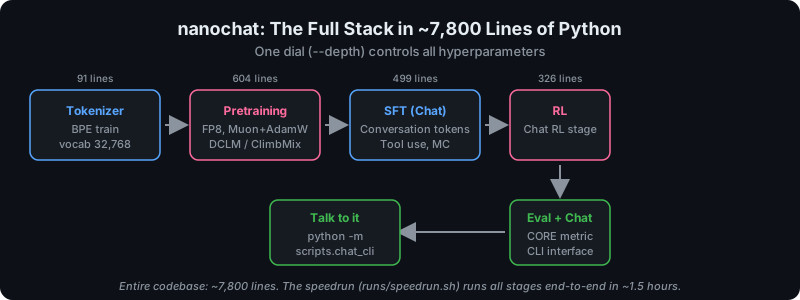
Figure 2 — The complete nanochat pipeline. The runs/speedrun.sh script runs all stages end-to-end on an 8×H100 node in ~1.5 hours.
The Single Dial: --depth
The standout design decision is that nanochat is configured around one complexity dial: --depth, the number of transformer layers. Set it once and everything else — the width, number of heads, learning rate, training horizon, weight decay, batch size — is automatically derived to be compute-optimal.
Want a quick 5-minute experiment? Use --depth=12 (GPT-1 sized). Want to reproduce GPT-2? Use --depth=26. Want to sweep a miniseries of models for scaling-law research? The runs/miniseries.sh script handles the entire sweep. This single-dial philosophy is what makes nanochat genuinely useful for research iteration: you change one number, re-run, and compare the val_bpb (bits per byte) and core_metric (DCLM CORE score) curves on wandb.
Modern Architecture, Not a 2019 Reproduction
The model in nanochat/gpt.py (555 lines) is not a faithful GPT-2 reproduction. It’s a thoroughly modernized transformer that incorporates techniques from 2024–2026:
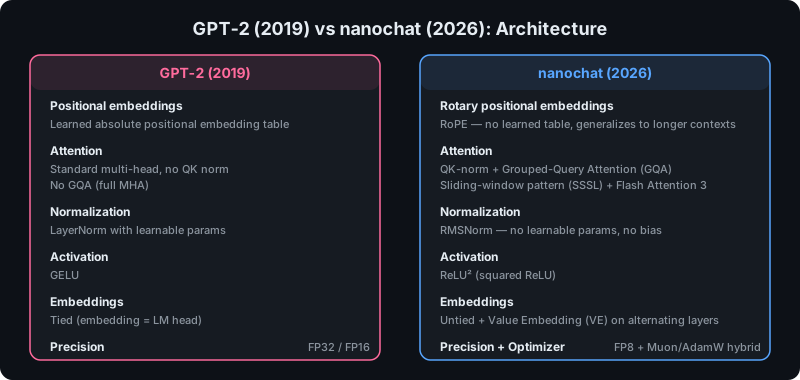
Figure 3 — nanochat replaces every component of the GPT-2 architecture with its 2026-era equivalent.
The architecture decisions are worth listing explicitly because they’re a microcosm of what changed in LLM design between 2019 and 2026:
- Rotary positional embeddings (RoPE) replace learned positional tables — no fixed context length, better generalization to longer sequences
- QK-norm stabilizes attention by normalizing query and key vectors before the dot product
- Grouped-Query Attention (GQA) reduces KV cache size for efficient inference (fewer KV heads than query heads)
- Sliding-window attention with pattern
"SSSL"— three short-context layers followed by one full-context layer, tiled across the stack - RMSNorm with no learnable parameters and no bias — simpler and faster than LayerNorm
- ReLU² activation in the MLP — squared ReLU, which has shown better scaling behavior than GELU
- Untied embeddings — the token embedding matrix and LM head are separate parameters
- Value Embedding (VE) on alternating layers — a learned additive embedding added to the value path
- FP8 training support via a custom
fp8.pymodule (266 lines) - Muon + AdamW hybrid optimizer — Muon for matrix parameters (using Newton-Schulz iteration for orthogonalized updates), AdamW for embeddings and scalars. This is adapted from
modded-nanogptand is the single biggest reason for the speedup.
The Speedrun Leaderboard
nanochat maintains a competitive “time-to-GPT-2” leaderboard, tracking the wall-clock time to train a model that beats GPT-2’s DCLM CORE score of 0.2565:
| # | Time | CORE | Date | Key innovation |
|---|---|---|---|---|
| 0 | 168 hr | 0.2565 | 2019 | Original OpenAI GPT-2 ($43,000) |
| 1 | 3.04 hr | 0.2585 | Jan 2026 | d24 baseline |
| 2 | 2.91 hr | 0.2578 | Feb 2026 | +FP8 training |
| 3 | 2.76 hr | 0.2602 | Feb 2026 | Batch size bump to 1M tokens |
| 4 | 2.02 hr | 0.2571 | Mar 2026 | Switch to NVIDIA ClimbMix dataset |
| 5 | 1.80 hr | 0.2690 | Mar 2026 | autoresearch round 1 |
| 6 | 1.65 hr | 0.2626 | Mar 2026 | autoresearch round 2 |
Seven years of progress — across the entire stack, from architecture to optimizer to data to FP8 kernels — compressed into a ~100× speedup. At the current pricing, an 8×H100 node ranges from ~$16/hr (Vast.ai spot) to ~$55/hr (AWS on-demand) — see the provider comparison below. The 1.65-hour speedrun costs anywhere from ~$26 to ~$91 depending on where you rent.
Hardware Requirements
This is where the “cheap” claim needs qualification. nanochat’s headline experience requires:
- Target hardware: 8×H100 (80GB) or 8×A100 (80GB) — a cloud rental at ~$24/hour
- Single GPU: works automatically via gradient accumulation, but ~8× slower
- <80GB VRAM: reduce
--device-batch-sizefrom the default 32 down to 16, 8, 4, 2, or 1 - CPU/MPS:
uv sync --extra cpuruns the code but at speeds that make iteration impractical
nanochat is cheap for LLM training. It is not free. $48 is a remarkable price for training a GPT-2-grade model from scratch, but it’s still a cloud GPU rental that requires setup, babysitting, and a credit card. For someone who wants to learn LLM training on a laptop or a single consumer GPU, nanochat’s entry point is higher than it needs to be.
The Cost Reality: $48 Is Cheap, But Not Free
The tension at the heart of “cheap LLM training for learning” is that the cheapest serious training setup (nanochat on 8×H100) still costs more than most people spend on software in a month. And the people most motivated to learn — students, hobbyists, engineers in early career — are precisely the ones least likely to have $50 to burn on a single training run that might OOM.
So the real question is: what can you do for less? And before answering that, it’s worth knowing exactly where to rent the 8×H100 node nanochat needs — because the price varies by 5× across providers.
Where to Rent 8×H100: The Provider Landscape
nanochat’s README estimates $48 for the speedrun, based on Lambda Labs at ~$3/GPU/hr. But Lambda has since raised prices, and the broader market has a much wider spread. Here’s the current pricing for an 8×H100 node as of July 2026:
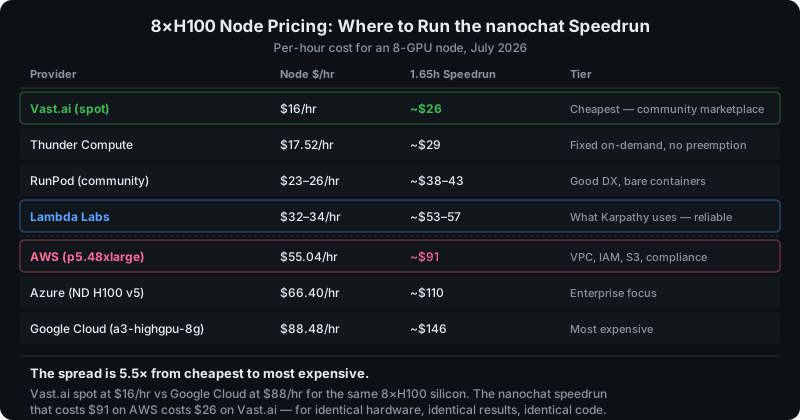
Figure 4 — The same 8×H100 silicon costs $16/hr on Vast.ai or $88/hr on Google Cloud. For a one-off training run, the infrastructure premium of hyperscalers buys nothing you need.
The key insight: AWS charges $55/hr for the same 8×H100 hardware that Vast.ai charges $16/hr for. That’s a 3.4× premium for VPC, IAM, S3 integration, and compliance certifications — features that matter for production workloads but are irrelevant for a one-off training run where you SSH in, run a script, and download the checkpoint.
Karpathy’s README says he uses Lambda, and Lambda is a reasonable middle ground at ~$32–34/hr. But the cheapest on-demand option today is Thunder Compute at ~$17.52/hr, and the cheapest overall is Vast.ai spot at ~$16/hr. For the 1.65-hour speedrun:
| Tier | Provider | Node $/hr | Speedrun cost | When to use |
|---|---|---|---|---|
| Cheapest | Vast.ai (spot) | ~$16 | ~$26 | Comfortable with community reliability, save checkpoints |
| Best value | Thunder Compute | ~$17.52 | ~$29 | Fixed on-demand, no preemption risk |
| Sweet spot | RunPod (community) | ~$23–26 | ~$38–43 | Good DX, SSH + Jupyter built in |
| Reliable | Lambda Labs | ~$32–34 | ~$53–57 | What Karpathy uses — stable, good support |
| Enterprise | AWS (p5.48xlarge) | $55.04 | ~$91 | Need VPC, IAM, compliance |
For someone who just wants to try nanochat once: use Vast.ai or Thunder Compute. You’ll pay ~$26–29 instead of $91, and the results are identical — same hardware, same code, same model.
MiniMind: The Standout for Single-GPU Learning
jingyaogong/minimind is the strongest answer. It’s wildly popular (trending #1 on GitHub TrendShift), actively developed (minimind-3 released April 1, 2026), and its pitch is uncompromising: train a complete small language model from scratch for ~$3 in ~2 hours on a single RTX 3090.
The model is tiny — 26M to 198M parameters, roughly 1/2700th the size of GPT-3 — but the pipeline is wider than nanochat’s in almost every dimension:
| Feature | nanochat | MiniMind |
|---|---|---|
| Minimum GPU | 8×H100 ($48/run) | 1× RTX 3090 (~$3/run) |
| Model size | ~1.6B (GPT-2 grade) | 26M–198M (Dense + MoE) |
| Architecture | Custom modern GPT | Aligned to Qwen3 / Qwen3-MoE |
| Pretraining | Yes | Yes |
| SFT | Yes | Yes |
| LoRA | No | Yes (from scratch, no peft) |
| DPO | No | Yes (from scratch) |
| PPO | No | Yes (from scratch) |
| GRPO | No | Yes (from scratch) |
| CISPO | No | Yes |
| Tool Use | Basic | Yes |
| Agentic RL | No | Yes |
| Model Distillation | No | Yes (white-box, native) |
| MoE | No | Yes |
| Multimodal | No | Yes (MiniMind-V vision, MiniMind-O omni) |
| Language | English only | Chinese + English |
| Inference compat | CLI only | llama.cpp, vLLM, Ollama, OpenAI API server |
| Web UI | No | Streamlit WebUI |
| From-scratch implementation | Yes | Yes — no HuggingFace/trl/peft abstractions |
Two things make MiniMind particularly valuable for learning:
First, every core algorithm — BPE tokenization, the transformer, LoRA, DPO, PPO, GRPO — is implemented from scratch in PyTorch with no reliance on transformers, trl, or peft high-level wrappers. You’re not calling Trainer.train(); you’re reading the actual gradient computation.
Second, the model architecture aligns with Qwen3 / Qwen3-MoE, meaning what you learn transfers directly to a real production model family. The tokenizer uses BPE + ByteLevel with <tool_call>/</think>/<tool_call> markers — the same chat template conventions production models use. And the trained models export to GGUF for llama.cpp, or can be served via a built-in OpenAI-compatible API server or a Streamlit web UI.
MiniMind’s philosophy is explicit in its README: “用乐高自己拼出一架飞机,远比坐在头等舱里飞行更让人兴奋” — building an airplane from Lego is more exciting than flying first class. The entire project is designed to lower the barrier to understanding an LLM, not just running one.
What If Your GPU Is Older Than a 3090?
MiniMind’s “2 hours for $3” figure assumes an RTX 3090. But what if you have an older card — a GTX 1080 with 8GB VRAM, for instance? The answer reveals something important about GPU architecture that goes beyond raw speed.
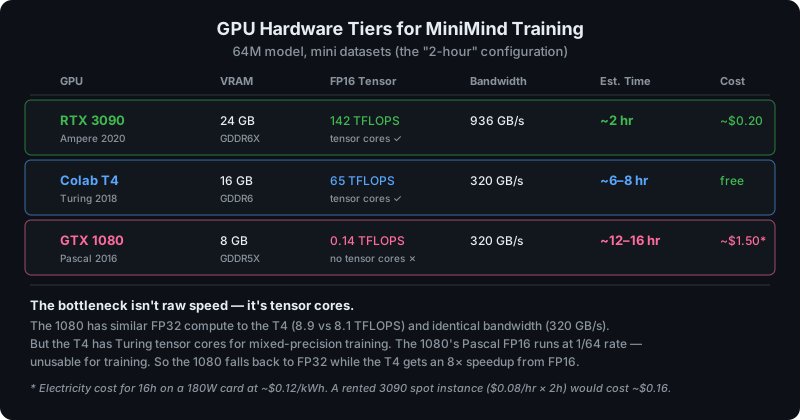
Figure 5 — GPU comparison for the 64M MiniMind model with mini datasets. The bottleneck isn’t raw FP32 speed — it’s tensor cores.
The GTX 1080 and the Colab T4 have nearly identical FP32 compute (8.9 vs 8.1 TFLOPS) and identical memory bandwidth (320 GB/s). But the T4 has Turing tensor cores that accelerate mixed-precision training by ~8×, while the 1080’s Pascal architecture has no tensor cores at all — its FP16 compute runs at 1/64th of FP32 rate, making mixed precision unusably slow and forcing you to train in pure FP32.
The practical result: MiniMind’s torch.cuda.amp.autocast gives the T4 a massive speedup that the 1080 can’t match. The 1080’s 8GB VRAM is sufficient for the 64M model (training needs ~3–4GB in FP32 with default batch sizes), but the compute gap means the same 2-hour run stretches to approximately 12–16 hours.
For context, the MiniMind author noted that on a Colab T4 with 1/10th of the dataset, training takes about 45 minutes total. Extrapolating to the full mini-dataset: ~6–8 hours on T4, and ~12–16 hours on the 1080 (which is slower than the T4 due to the lack of tensor cores despite slightly higher FP32 throughput).
Practical tips for training on a GTX 1080:
- Use the smallest model — MiniMind-3 (64M) or MiniMind2-Small (26M). The 26M will be faster, roughly 6–8 hours
- Use the mini datasets —
pretrain_t2t_mini.jsonlandsft_t2t_mini.jsonl— the same reduced datasets that produce the 2-hour/3090 figure - Batch size 32 should fit in 8GB for the 64M model. If you OOM, drop to 16
- Force FP32 if autocast is slow — Pascal FP16 is 1/64th rate, so mixed precision can actually be slower than pure FP32 on the 1080
- Train overnight — 12–16 hours means starting in the evening and checking results the next morning. Use
screenortmux - Or just rent a 3090 — On Vast.ai, a 3090 spot instance costs ~$0.08–0.10/hr. Two hours = ~$0.20. That’s cheaper than the electricity your 1080 will burn over 16 hours, and the MiniMind author himself recommends renting over using personal GPUs
- Or use free Colab — The free T4 on Colab would do it in ~6–8 hours at no cost, with the caveat of 12-hour session limits (split pretrain and SFT into separate sessions)
Other Alternatives
TinyLLM: CPU, Free, Zero GPU Required
Mikyx-1/TinyLLM explicitly positions itself against the cloud-GPU requirement of nanoGPT and nanochat. Its pitch: every stage of a real LLM pipeline — BPE tokenizer training, pretraining on raw text, instruction fine-tuning, reasoning fine-tuning with calculator tool-use, and a browser-based chat interface — runs end-to-end on a single consumer GPU you already own, or even on CPU.
- Minimum hardware: none — falls back to CPU automatically. Recommended: RTX 3060 (12GB)
- Model size: 50M parameters
- Training time: minutes to hours, not days
- Every component is heavily commented for teaching
The code includes a real browser-based streaming chat UI (a stdlib HTTP server with no extra dependencies) that renders each token as it’s generated — the same streaming mechanic production chat APIs use. This is the best choice for an absolute beginner who has no GPU budget and wants to understand what every line of an LLM pipeline does.
modded-nanogpt: The Speedrun Ancestor
KellerJordan/modded-nanogpt is the project that inspired nanochat’s leaderboard. It’s a competitive hackathon to train GPT-2 (124M) in under 90 seconds on 8×H100. The focus is purely on training throughput optimization — custom CUDA kernels, FP8, the Muon optimizer. nanochat’s Muon optimizer and FP8 support are both adapted from this repo.
It’s not educational in the gentle sense — it’s a racing project. But if you care about the bleeding edge of how fast you can train, the techniques here (and in nanochat’s leaderboard progression) are the state of the art.
LitGPT: Production-Leaning, Real Architectures
Lightning-AI/litgpt (13,400+ stars, Apache 2.0) is not “from scratch” like nanochat — it’s a clean, readable implementation that supports 20+ real model architectures (Llama, Qwen, Gemma, Phi, etc.) with pretrain, finetune, and deploy recipes. More abstraction than nanochat, but far less than HuggingFace transformers. Includes built-in evaluation, quantization, and deployment. The right choice when you want to move beyond educational toys toward training real model architectures while keeping the code readable.
The Learning Path
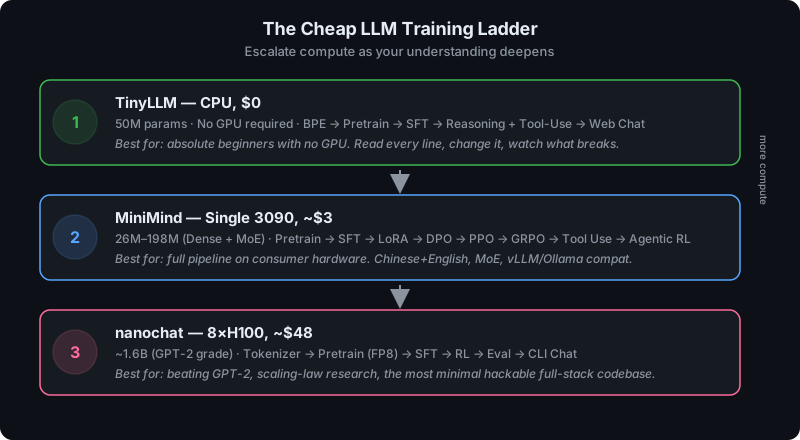
Figure 6 — The recommended escalation path. Start free on CPU, move to a single GPU, then to multi-GPU when you’re ready for real research.
The ideal learning path escalates compute as understanding deepens:
-
TinyLLM (CPU, $0) — Start here with no GPU. Train a 50M model end-to-end, read every line, understand BPE tokenization, attention, pretraining, SFT, and tool use. Change things and watch what breaks. This costs nothing and teaches the shape of the entire pipeline.
-
MiniMind (single 3090, ~$3) — Graduate to a real GPU. Train a 64M–198M model with the full post-training stack: LoRA, DPO, PPO, GRPO, agentic RL, distillation. Learn MoE architecture, Chinese+English tokenization, and export to real inference engines (vLLM, Ollama). The $3 cost means you can run it multiple times, experiment, and iterate without anxiety.
-
nanochat (8×H100, ~$48) — When you’re ready for real research. Beat GPT-2, study scaling laws, experiment with the speedrun leaderboard. This is where the compute-optimal training regime lives, and where the Muon optimizer, FP8, and modern architecture choices matter most.
Each step is roughly 10–16× more expensive than the last, and each teaches something the previous step can’t. But you don’t need to start at step 3 — and for most learners, steps 1 and 2 are where the real understanding happens.
Bottom Line
nanochat is excellent — the most complete, modern, and hackable full-stack LLM training codebase available, with Karpathy’s signature pedagogical clarity. It’s the natural evolution of nanoGPT with 2025–2026-era techniques, and the speedrun leaderboard is a genuine contribution to the open training-optimization community.
But for the specific goal of training LLMs cheaply for learning, the honest answer is that MiniMind is better suited to most people’s constraints. It runs on a single consumer GPU for $3, covers a wider training pipeline (MoE, PPO, GRPO, tool use, agentic RL, distillation), supports Chinese and English, and exports to real inference engines. nanochat’s $48/8×H100 requirement, while cheap for LLM training, is still a cloud rental that most learners won’t attempt casually.
The good news is that you don’t have to choose. The ecosystem is now rich enough that there’s a clear path from $0 to $48, each step building on the last, and each project open-source, readable, and genuinely educational. Seven years after GPT-2 cost $43,000, the barrier to understanding how language models are trained has dropped to the price of a coffee.