Running Local LLMs on a 24GB Mac: What Fits and What Doesn't
The 30-minute reply
I wired up a local model as the brain for a small AI agent — an OpenAI-compatible gateway pointed at Ollama’s /v1 endpoint — and asked it a one-line question. Then I watched it sit there:
⏳ Still working... (10 min elapsed — waiting for stream response, no chunks yet)⏳ Still working... (20 min elapsed — waiting for stream response, no chunks yet)⏳ Still working... (30 min elapsed — waiting for stream response, no chunks yet)Thirty minutes for a single answer, and most of it spent before the first token even appeared. The model was Qwen3.6-27B in its MLX build, running on a 24 GB Apple Silicon Mac. On paper it fit. In practice it was unusable.
This post is the short version of the rabbit hole: what was actually happening, the two things I got wrong, and the rules I’d give my past self. If you’re trying to run mid-size models locally on a 24 GB Mac, hopefully this saves you an afternoon.
What “no chunks yet” actually means
“No chunks yet” is the tell. Generation speed (tokens/second) only matters after the first token. If you’re stuck before that, the bottleneck is time-to-first-token — loading the model and processing the prompt — not decode speed.
The first thing I checked was what Ollama thought it was doing:
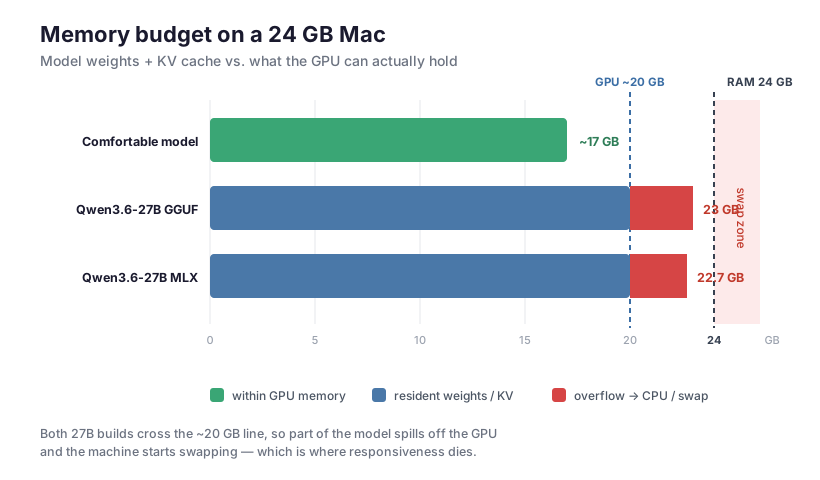
$ ollama psNAME SIZE PROCESSOR CONTEXT UNTILqwen3.6:27b-mlx 21 GB 100% GPU 262144 Stopping...CONTEXT 262144. That’s a 256K-token context window — the model’s full native size. Allocating the key/value cache for 256K tokens, on top of ~19 GB of weights, pushed peak memory to 22.7 GiB. Then:
$ sysctl vm.swapusagevm.swapusage: total = 8192.00M used = 7263.19M free = 928.81MSwap was nearly exhausted. The machine wasn’t computing — it was thrashing, paging the model in and out of disk on every step. That’s where the 30 minutes went.
The mental model is simple once you draw it: the model needed more memory than the GPU can hold, so it spilled over the edge into swap.
Mistake #1: assuming I could just shrink the context
If the 256K context is the problem, cap it, right? Ollama takes a num_ctx option. So I tried — every way there is:
# 1. request optioncurl .../api/generate -d '{"model":"qwen3.6:27b-mlx","options":{"num_ctx":16384}, ...}'# 2. baked into a Modelfileprintf 'FROM qwen3.6:27b-mlx\nPARAMETER num_ctx 16384\n' | ollama create qwen-ctx -f -# 3. server-wide env varOLLAMA_CONTEXT_LENGTH=16384 ollama serveAfter each one, ollama ps still said CONTEXT 262144.
The MLX runner ignores num_ctx entirely — request option, Modelfile parameter, and the server env var all had no effect (Ollama 0.23.0). It always loads the model’s native context. There’s no knob. That was the surprise that reframed the whole problem.
Mistake #2: assuming the model “fit” because the file was 19 GB
So I switched formats. The same model exists as a GGUF build (q4_K_M, ~17 GB on disk), which runs on Ollama’s regular engine instead of the MLX runner. And here’s the good news:
$ ollama psNAME SIZE PROCESSOR CONTEXT UNTILqwen3.6:27b-q4_K_M 23 GB 13%/87% CPU/GPU 16384 ...CONTEXT 16384 — the GGUF engine honors num_ctx. The thing MLX refused to do, GGUF does for free.
But look at the other two columns. SIZE 23 GB and 13%/87% CPU/GPU. Even with a tiny context, the weights themselves load to ~22–23 GB — over the ~20 GB the GPU can use — so ~13% of the model spilled onto the CPU, and it kept swapping. I dropped the context all the way to 4K; the size barely moved (23 → 22 GB). It was never the KV cache. It was the weights.
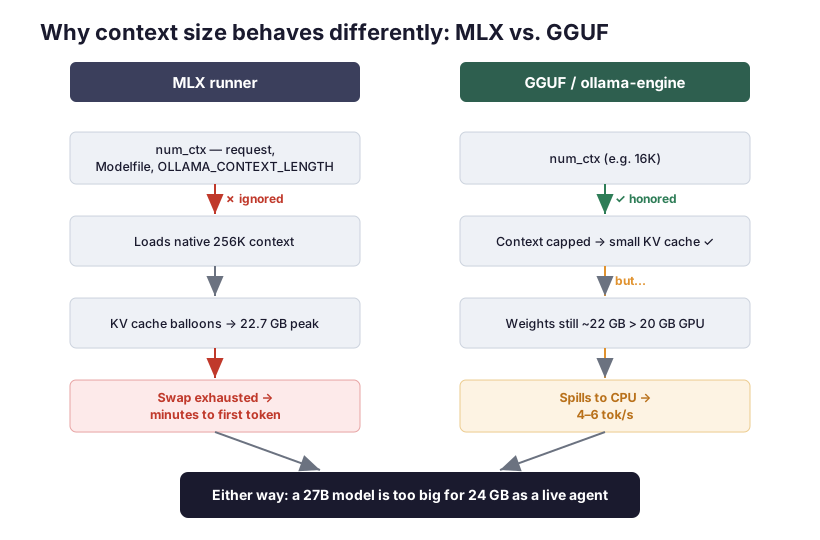
Two different engines, same destination: a 27B model is simply too big for 24 GB to run as a responsive agent.
The numbers
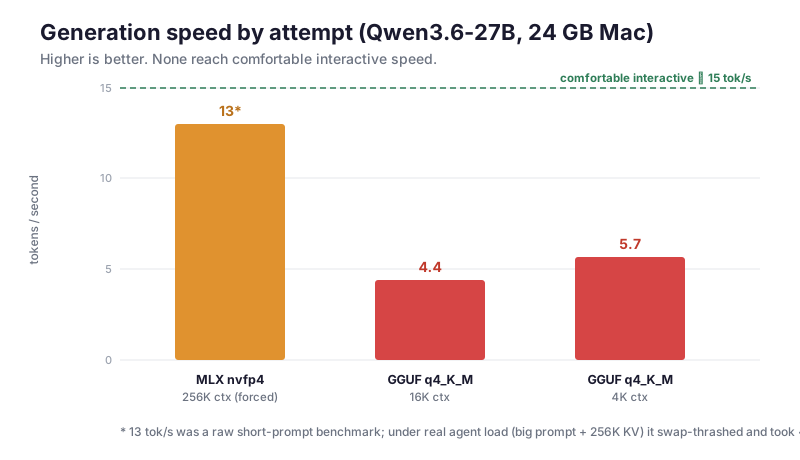
| Attempt | Context | Loaded size | Speed | Verdict |
|---|---|---|---|---|
| 27B MLX (nvfp4) | 256K (forced) | ~22.7 GB peak | 13 tok/s* | ❌ 30-min hangs under load |
| 27B GGUF q4_K_M | 16K | ~23 GB | 4.4 tok/s | ❌ CPU offload + swap |
| 27B GGUF q4_K_M | 4K | ~22 GB | 5.7 tok/s | ❌ still spills to CPU |
* The 13 tok/s was a raw, short-prompt benchmark on an otherwise idle machine. Under real agent load — a large system prompt plus a 256K KV cache — it swap-thrashed into the 30-minute territory above.
Raising the GPU memory limit further isn’t a fix either: at 22 GB wired on a 24 GB machine you starve macOS itself, and it starts swapping instead. There’s no setting that conjures more RAM.
What actually works
The whole saga collapses into a few rules:
-
Budget for the model that loads, not the file on disk. A “17 GB” GGUF can occupy 22–23 GB resident once you add dequant working memory, KV cache, and compute buffers. On 24 GB, aim for a model that loads in ≤ ~17 GB so it sits fully on the GPU with headroom for the OS.
-
For 24 GB, that means ≤ ~14B–20B-class models. A 27B is the wrong tool here regardless of quantization or format. Pick a smaller model and you get consistent speed instead of cliff-edge swapping.
-
If you need to cap the context window, use GGUF, not MLX. MLX ignores
num_ctxand loads the model’s full native context — which for modern models can be 256K, and that KV cache alone can blow your budget. GGUF on Ollama’s standard engine respectsnum_ctx. -
Read
ollama pslike a dashboard.CONTEXTtells you if your context cap took effect.PROCESSORshowing anything other than100% GPUmeans part of the model is on the CPU — expect it to crawl. Pair it withsysctl vm.swapusage; iffreeis near zero, you’re thrashing. -
On Apple Silicon, the GPU can use ~75% of unified memory by default. You can raise it (
sudo sysctl iogpu.wired_limit_mb=20480) to load a model that otherwise won’t fit — but Ollama only reads that limit at startup, so restart it afterward (brew services restart ollama). To make it survive reboots, install it as a LaunchDaemon (a LaunchAgent won’t work —sysctlneeds root). And remember this only trades a hard “out of memory” error for soft swap thrashing; it doesn’t make an oversized model fast.
Two bonus gotchas
-
Disabling the “thinking” trace. Reasoning models emit a long hidden trace that dominates latency. Over an OpenAI-compatible endpoint, a top-level
reasoning_effort: "none"turns it off — the nativethink: falseflag and/no_thinkprompt toggle were both ignored by the build I tested. Cutting the trace roughly doubled effective speed. -
Deleting a model didn’t free disk space. macOS keeps freed blocks in APFS local Time Machine snapshots, so
dfstill showed the disk full afterollama rm.sudo tmutil thinlocalsnapshots / 21474836480 4reclaims it (this only touches the local snapshot cache, not real backups).
The takeaway
A 24 GB Mac is a genuinely capable local-AI machine — for the right size of model. The mistake isn’t the hardware; it’s reaching for a 27B because it technically loads. It loads, then drowns in swap.
I moved the latency-sensitive agent back to a hosted model and kept the local setup for smaller models that fit with room to spare. If you want a fast local agent on 24 GB, start at 14B, watch ollama ps, and only climb as long as PROCESSOR stays at 100% GPU. The moment it splits to the CPU, you’ve found your ceiling.